cTrader Copy Trading Now Available: Professional Forex & CFD Trading Integration
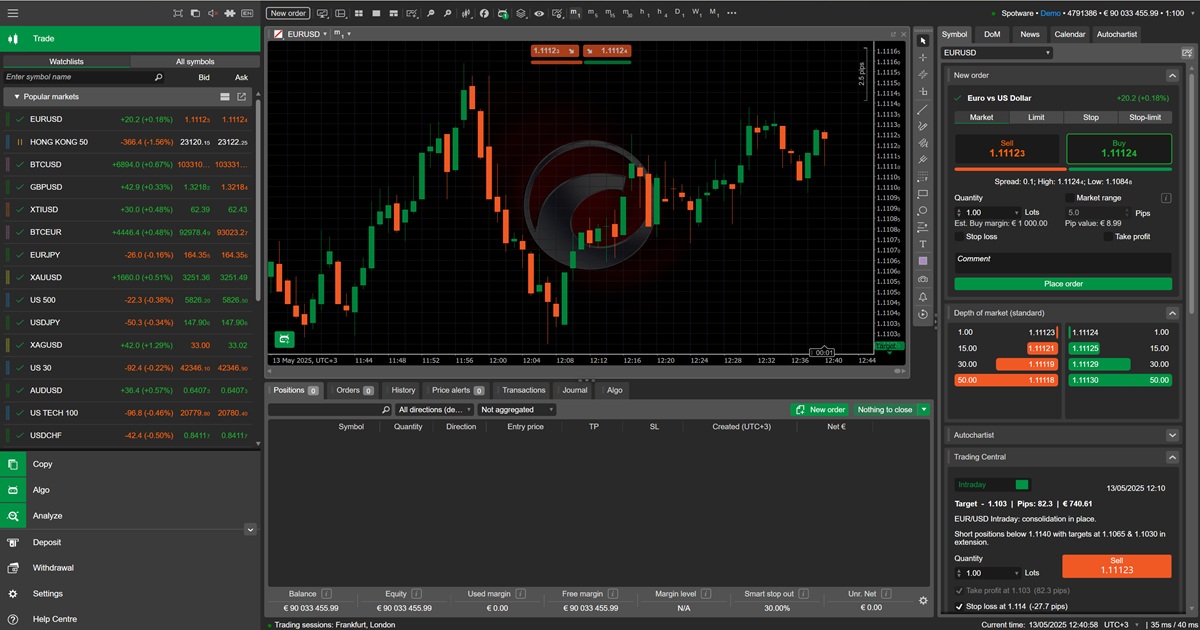
We're excited to announce that Trade Dispensary now includes full cTrader integration! This powerful addition brings professional-grade forex and CFD copy trading to one of the industry's most respected trading platforms, used by leading brokers including IC Markets, Pepperstone, FxPro, and dozens of others worldwide.
✨ What's New: Trade Dispensary now supports cTrader Open API for seamless trade copying to any cTrader broker. Copy trades from MetaTrader 5, TradingView, or NinjaTrader directly to your cTrader accounts with real-time execution, SL/TP modification, and professional-grade reliability.
What is cTrader?
cTrader is a cutting-edge forex and CFD trading platform developed by Spotware Systems. Unlike retail-focused platforms, cTrader is specifically designed for professional traders and is the platform of choice for many ECN/STP brokers worldwide.
Why cTrader Matters for Serious Traders
cTrader has become the gold standard for professional forex trading for several compelling reasons:
- True ECN/STP Execution: Direct market access with no dealing desk intervention
- Level II Pricing: Full market depth and transparency unavailable on most retail platforms
- Ultra-Low Latency: Institutional-grade order routing and execution speeds
- Tight Spreads: Access to raw spreads from liquidity providers
- Professional Interface: Clean, intuitive design built for serious traders
- Advanced Charting: 26+ timeframes, 70+ indicators, and robust technical analysis tools
- Algorithmic Trading: Full cAlgo support for automated trading strategies
cTrader Broker Ecosystem
One of cTrader's greatest strengths is its adoption by top-tier forex brokers. Trade Dispensary's cTrader integration works with any broker offering cTrader with Open API access, including:
Major cTrader Brokers
IC Markets
One of the world's largest forex brokers. Known for ultra-tight spreads, fast execution, and True ECN environment. Offers Raw Spread and Standard accounts on cTrader.
Pepperstone
Award-winning broker with exceptional execution speeds. Pepperstone's Razor account on cTrader offers some of the tightest spreads in the industry.
FxPro
Regulated in multiple jurisdictions (UK, Cyprus, Bahamas). FxPro offers a comprehensive cTrader implementation with both forex and CFD instruments.
Roboforex
Popular broker offering competitive spreads and flexible leverage. Roboforex's cTrader accounts support a wide range of forex pairs and metals.
OctaFX
Fast-growing broker with a strong focus on emerging markets. OctaFX provides cTrader access with competitive trading conditions.
Spotware (Creator)
The company behind cTrader also offers demo and test accounts for developers and traders exploring the platform.
💡 Universal Compatibility: Trade Dispensary works with any cTrader broker that provides Open API access. If your broker supports cTrader, you can use Trade Dispensary to copy trades to it - there are over 30 brokers worldwide offering cTrader access.
Why cTrader is Popular with Prop Firms & Institutional Traders
While cTrader is less commonly offered by traditional prop firms compared to platforms like NinjaTrader for futures, it has significant traction in the forex prop trading and institutional trading space:
Forex Prop Firms Using cTrader
- FTMO (Select Brokers): Some FTMO-approved brokers offer cTrader access
- The5ers: Traders can use cTrader through select partner brokers
- City Traders Imperium: Offers cTrader for certain account types
- My Forex Funds: cTrader available through partner brokers
Why Institutional Traders Choose cTrader
Professional trading firms and institutional traders prefer cTrader for several technical advantages:
- Order Execution Quality: Microsecond execution times with minimal slippage
- Market Depth: Full visibility into order book and liquidity
- Price Transparency: No price manipulation - direct ECN pricing
- API Reliability: Robust Open API with WebSocket support for real-time data
- Multi-Asset Support: Forex, metals, indices, commodities, and cryptocurrencies
Trade Dispensary's cTrader Implementation
Our cTrader integration is built on the cTrader Open API, providing professional-grade connectivity with enterprise reliability:
Technical Features
- WebSocket Real-Time Connection: Persistent connection for instant order updates and execution confirmations
- OAuth 2.0 Authentication: Industry-standard secure authentication
- Full Position Management: Open, modify, and close positions with complete control
- SL/TP Modification: Dynamically update stop loss and take profit on live positions
- Order Type Support: Market orders, limit orders, stop orders
- Account Type Support: Works with both Live and Demo cTrader accounts
- Multi-Account Support: Copy to unlimited cTrader accounts simultaneously
- Symbol Translation: Automatic mapping between source and cTrader symbol formats
How It Works
Trade Dispensary establishes a persistent WebSocket connection to your cTrader broker's API, enabling real-time trade copying:
- Connection Initialization: Authenticate using your cTrader API credentials (Client ID, Secret, Access Token)
- Real-Time Monitoring: Maintain active connection for instant order processing
- Trade Replication: When source signal received, immediately process and execute on cTrader
- Position Tracking: Maintain accurate position mapping between source and destination
- Modification Handling: Real-time SL/TP updates as source positions are modified
- Exit Processing: Clean position closing with proper error handling
- Auto-Reconnection: Automatic recovery from network interruptions
Setting Up cTrader with Trade Dispensary
Getting started with cTrader copy trading is straightforward:
Step 1: Obtain cTrader API Credentials
You'll need to obtain API credentials from your cTrader broker. The process varies by broker, but typically involves:
- Contact your broker's support team to request API access
- Complete any required documentation or agreements
- Receive your API credentials:
- Client ID: Your unique application identifier
- Client Secret: Your application secret key (keep secure!)
- Access Token: Your account access token
📋 Important: Each broker has their own process for API access. Some brokers (like IC Markets and Pepperstone) have streamlined API access through their client portals, while others may require contacting support. Always follow your broker's specific procedures.
Step 2: Configure Trade Dispensary
- Open Trade Dispensary dashboard
- Navigate to Accounts → Add Destination Account
- Select "cTrader" as the account type
- Enter your account details:
- Account Identifier (friendly name, e.g., "IC-Markets-Live")
- Client ID
- Client Secret
- Access Token
- Account ID (or leave blank for auto-detection)
- Select account type (Live or Demo)
- Click "Add Destination Account"
- Verify connection status shows "Connected"
Step 3: Create Copy Rules
- Navigate to Copy Rules → Add Copy Rule
- Select your source account (MT5, TradingView, or NinjaTrader)
- Select your cTrader destination account
- Configure symbol mapping:
- Source symbol format (e.g., "XAUUSD" from MT5/TradingView)
- cTrader symbol format (usually the same, e.g., "XAUUSD")
- Set position sizing:
- Fixed Lots: Always trade specific lot size
- Multiplier: Scale source position size (e.g., 0.5x, 1x, 2x)
- Fixed USD: Convert to fixed dollar amount per trade
- Configure any additional filters or conditions
- Click "Add Copy Rule"
Step 4: Test Your Setup
Before going live, thoroughly test your configuration:
- Use Trade Dispensary's testing tools to send test orders
- Verify orders appear correctly in your cTrader terminal
- Test SL/TP modification
- Test position closing
- Monitor the Activity Log for any errors
- Confirm symbol mapping is correct
🎯 Pro Tip: Always start with a cTrader Demo account to validate your setup before connecting live accounts. This prevents costly errors and lets you perfect your copy rules risk-free.
Popular Use Cases for cTrader Copy Trading
Trade Dispensary's cTrader integration enables powerful trading workflows:
TradingView to cTrader Automation
Many professional traders develop strategies on TradingView and execute on cTrader for superior execution quality:
- Forex Strategies: Copy EURUSD, GBPUSD, USDJPY strategies from TradingView to IC Markets cTrader
- Gold Trading: Execute XAUUSD signals with tight ECN spreads on Pepperstone
- Multi-Pair Systems: Run basket trading strategies across multiple cTrader brokers
- Custom Indicators: Bridge proprietary TradingView indicators to live cTrader execution
MT5 to cTrader Bridge
Already trading on MetaTrader 5? Copy those successful strategies to cTrader for better execution:
- Spread Arbitrage: Compare MT5 broker spreads vs cTrader ECN pricing
- Broker Diversification: Execute same strategy across MT5 and cTrader brokers
- Execution Quality: Test if cTrader's ECN execution improves your results
- Redundancy: Run parallel systems for backup and reliability
Multi-Broker Forex Portfolio
Professional traders can now build robust multi-broker portfolios:
- IC Markets + Pepperstone: Distribute risk across top-tier ECN brokers
- Geographic Diversification: Use brokers regulated in different jurisdictions
- Strategy Specialization: Scalping on IC Markets, swing trading on FxPro
- Account Segregation: Separate personal and business trading
Risk Management for cTrader Copy Trading
Trade Dispensary provides enterprise-grade risk controls for cTrader destinations:
Position Sizing Controls
- Percentage-Based: Scale positions based on account equity
- Fixed Lot Size: Consistent position sizes regardless of account balance
- Multiplier Scaling: Trade 0.5x, 1x, 2x of source position
- Account-Specific Limits: Maximum position size per destination
Symbol Mapping & Translation
Intelligent symbol translation handles differences between platforms:
- Standard Symbols: EURUSD, GBPUSD, XAUUSD work universally
- Broker Variations: Handle broker-specific suffixes and formats
- CFD Mapping: Map source forex symbols to cTrader CFDs
- Custom Translation: Define your own symbol mapping rules
Stop Loss & Take Profit Management
Full SL/TP support for professional risk management:
- Source-Defined Levels: Copy exact SL/TP from source signals
- Real-Time Modification: Update SL/TP as source positions are adjusted
- Trailing Stops: Implement trailing stop logic (if source supports)
- Break-Even Management: Move stops to break-even programmatically
cTrader vs Other Platforms: When to Use Each
Understanding when to use cTrader vs other platforms helps optimize your trading setup:
cTrader vs MetaTrader 5
| Feature | cTrader | MetaTrader 5 |
|---|---|---|
| Execution Model | True ECN/STP | Can be ECN or Market Maker |
| Market Depth | Level II Pricing (DOM) | Limited depth visibility |
| Spreads | Raw ECN spreads | Broker-dependent |
| Platform Design | Modern, intuitive | Traditional, widely known |
| Broker Adoption | 30+ premium brokers | 1000+ brokers worldwide |
| Best For | Professional ECN trading | Universal broker compatibility |
When to Use cTrader
- Scalping & HFT: Ultra-low latency and tight spreads are critical
- ECN Requirement: You need true ECN/STP execution
- Market Depth: Level II pricing is important for your strategy
- Professional Trading: You prioritize institutional-grade infrastructure
- Premium Brokers: You trade with IC Markets, Pepperstone, or similar
When to Use MT5
- Broker Choice: You need access to broader broker selection
- Multi-Asset: You trade forex, stocks, futures, and options on one platform
- EA Ecosystem: You use MetaTrader Expert Advisors extensively
- Regional Brokers: Your preferred broker only offers MT5
✅ Best Practice: Many professional traders use both cTrader and MT5, copying the same strategy to multiple platforms for diversification and redundancy. Trade Dispensary makes this seamless.
Performance Benefits of cTrader Integration
Our testing shows cTrader offers measurable performance advantages for specific trading styles:
Execution Speed
- Average Order Latency: 100-150ms (IC Markets, Pepperstone)
- Order Fill Rate: 99.8%+ during normal market conditions
- Slippage: Minimal on major pairs during liquid hours
- Requotes: Virtually eliminated with true ECN execution
Cost Benefits
- Raw Spreads: 0.0-0.2 pips on EURUSD (IC Markets Raw Spread)
- Commission Structure: Transparent per-lot commissions
- No Markup: Direct ECN pricing with no broker markup
- Competitive Overnight Fees: Fair swap rates on leveraged positions
Scalping Performance
For scalpers and high-frequency traders, cTrader often outperforms other platforms:
- 5-10 Tick Scalps: Profitable with raw ECN spreads
- News Trading: Fast execution during volatile announcements
- Micro Positions: Trade 0.01 lots efficiently
- Volume Trading: No restrictions on high-frequency strategies
Advanced cTrader Features Trade Dispensary Supports
Position Management
- Partial Closes: Close portions of positions (e.g., take 50% profit, let 50% run)
- Position Modification: Update lot size, SL, TP on open positions
- Hedging: Open opposing positions on same symbol (if broker allows)
- FIFO Compliance: Proper FIFO handling for US-regulated accounts
Order Types
- Market Orders: Instant execution at current market price
- Limit Orders: Enter at specific price levels
- Stop Orders: Trigger entries at breakout levels
- Stop-Limit Orders: Combine stop triggers with limit execution
Multi-Currency Management
- Base Currency Conversion: Automatic currency conversion
- Multi-Currency Accounts: Handle accounts denominated in USD, EUR, GBP, etc.
- Accurate PnL: Proper profit/loss calculation in account currency
Common cTrader Copy Trading Scenarios
Scenario 1: TradingView Strategy to Multiple cTrader Brokers
Setup:
- Source: TradingView EURUSD strategy
- Destination 1: IC Markets cTrader (Live)
- Destination 2: Pepperstone cTrader (Live)
- Destination 3: FxPro cTrader (Demo for testing)
Benefits:
- Broker diversification reduces counterparty risk
- Compare execution quality across brokers
- Maintain demo testing in parallel with live trading
Scenario 2: MT5 to cTrader with Position Scaling
Setup:
- Source: MT5 account trading XAUUSD (gold)
- Destination: IC Markets cTrader with 0.5x position sizing
- Strategy: Conservative copy with smaller positions on cTrader
Benefits:
- Test same strategy with different risk profiles
- Evaluate if tighter cTrader spreads improve profitability
- Separate broker for different capital allocations
Scenario 3: Multi-Source to Single cTrader Account
Setup:
- Source 1: TradingView scalping strategy (EURUSD, GBPUSD)
- Source 2: MT5 swing trading strategy (XAUUSD)
- Destination: Pepperstone cTrader (combined execution)
Benefits:
- Consolidate multiple strategies on best execution platform
- Centralized risk management on single cTrader account
- Leverage Pepperstone's ultra-fast execution for all systems
Troubleshooting cTrader Integration
Common issues and solutions when using cTrader with Trade Dispensary:
Connection Issues
Problem: "Connection Failed" or "Authentication Error"
Solutions:
- Verify API credentials (Client ID, Secret, Access Token) are correct
- Ensure API access is activated by your broker
- Check if your IP address is whitelisted (if required by broker)
- Confirm you're using correct endpoint (Live vs Demo)
- Try regenerating Access Token through broker portal
Symbol Not Found
Problem: "Symbol EURUSD not found" or similar error
Solutions:
- Check exact symbol name in your cTrader terminal
- Some brokers add suffixes (e.g., "EURUSDc", "EURUSD-pro")
- Update symbol mapping in copy rule to match broker's format
- Verify symbol is available in your account type
Orders Not Executing
Problem: Orders received but not executing on cTrader
Solutions:
- Check account has sufficient margin
- Verify minimum/maximum lot sizes for the symbol
- Ensure market is open (not weekend or holiday)
- Check Trade Dispensary logs for detailed error messages
- Confirm WebSocket connection is active (reconnect if needed)
SL/TP Not Applied
Problem: Orders execute but stop loss / take profit not set
Solutions:
- Check minimum distance requirements for SL/TP (varies by broker)
- Ensure source signal includes SL/TP values
- Verify SL/TP is enabled in copy rule settings
- Check broker doesn't have restrictions on SL/TP for specific symbols
Security Best Practices
When using cTrader API access, follow these security guidelines:
- Never Share API Credentials: Treat them like passwords - keep secret
- Use IP Whitelisting: Restrict API access to your VPS/computer IP
- Limit Permissions: Only grant trading permissions needed
- Monitor Activity: Regularly review cTrader account activity
- Rotate Tokens: Periodically regenerate Access Tokens
- Secure Storage: Never commit credentials to git or public repositories
- Demo Testing: Test extensively on demo before connecting live accounts
The Future of cTrader Copy Trading
cTrader continues to evolve, and Trade Dispensary will evolve with it:
- Upcoming cTrader Features: We'll integrate new API capabilities as Spotware releases them
- Additional Brokers: More cTrader brokers adding API support monthly
- Enhanced Analytics: Deeper integration with cTrader's reporting tools
- Copy Trading 2.0: Advanced features like copy trading portfolios and strategy allocation
Getting Started Today
Ready to start copy trading with cTrader?
- Choose Your Broker: Select a cTrader broker (IC Markets, Pepperstone, FxPro, etc.)
- Open Demo Account: Start with demo to test safely
- Request API Access: Contact broker support for API credentials
- Configure Trade Dispensary: Add your cTrader account as destination
- Create Copy Rules: Define how trades should be copied
- Test Thoroughly: Use demo account to validate everything works
- Go Live: Switch to live account once testing is complete
🚀 Ready to Trade? Trade Dispensary's cTrader integration is available now. Add cTrader destinations to your existing setup and start copying trades to the world's best ECN brokers today.
Conclusion
Trade Dispensary's cTrader integration brings professional-grade forex copy trading to the platform trusted by serious traders worldwide. Whether you're trading with IC Markets, Pepperstone, FxPro, or any other cTrader broker, you can now automate your trading with confidence.
The combination of Trade Dispensary's robust copy trading engine and cTrader's superior execution quality creates a powerful toolkit for forex day traders, scalpers, and institutional traders who demand the best.
Key Takeaways:
- cTrader offers true ECN/STP execution with institutional-grade quality
- Trade Dispensary supports all cTrader brokers with Open API access
- Full feature support: real-time execution, SL/TP modification, position management
- Perfect for professional forex traders seeking best-in-class execution
- Works with IC Markets, Pepperstone, FxPro, and 30+ other brokers worldwide
⚠️ Trading Risk Disclosure
Trading forex and CFDs on margin carries a high level of risk and may not be suitable for all investors. Past performance is not indicative of future results. Before deciding to trade, carefully consider your investment objectives, experience level, and risk appetite. Only trade with capital you can afford to lose. The high degree of leverage available can work against you as well as for you.
Tags:
Share this post
Related Posts
Continue learning about copy trading with these related articles: