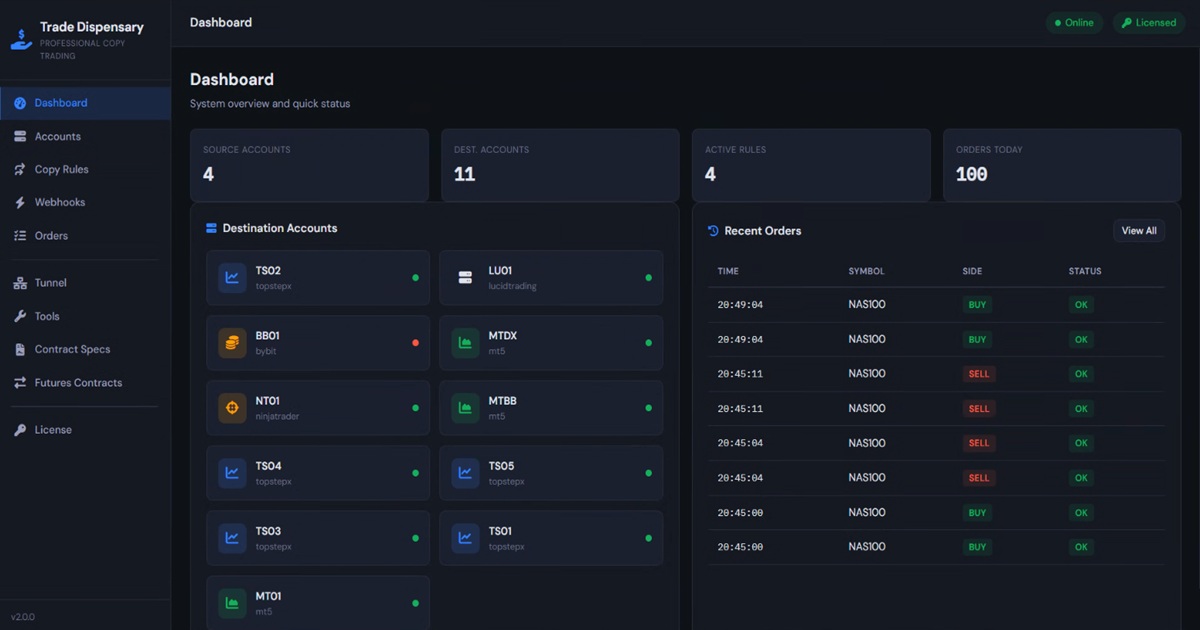
Why We Rebuilt Trade Dispensary from the Ground Up
After working closely with hundreds of prop firm traders using TopstepX and other prop firm platforms, we identified three critical pain points:
- Latency kills scalping strategies: Slow API lookups between signal and execution meant missed entries and poor fills
- CFD to futures copying was broken: Price scale differences between MT5/cTrader and NinjaTrader caused SL/TP placement failures
- Contract rollovers took hours: Manually updating symbols across dozens of copy rules every month was tedious and error-prone
Trade Dispensary 2.0 solves all three problems with a completely rewritten codebase focused on performance, accuracy, and automation.
Speed Mode: Lightning-Fast Order Entry
The biggest improvement in version 2.0 is Speed Mode for TopstepX via the ProjectX API.
The Problem: Every order to a ProjectX platform required an API call to search for the contract ID. For futures like MNQ or ES, this lookup added significant latency on every single entry.
The Solution: Trade Dispensary 2.0 caches contract IDs after the first lookup. Subsequent orders skip the search entirely, delivering dramatically faster order entry on TopstepX.
How Speed Mode Works
- First Order: System searches for "MNQH26" via ProjectX API (standard lookup)
- Cache Contract ID: Saves the platform contract ID (e.g., "CON.F.US.MNQ.H26")
- Future Orders: Uses cached ID directly (lightning-fast execution)
- One-Click Rollover: Update to next contract month instantly
This dramatic speed improvement is critical for scalping strategies on volatile instruments like Micro Nasdaq (MNQ), E-mini S&P 500 (ES), and Micro Gold (MGC).
Price Translate: Accurate CFD to Futures Copying
If you've ever tried copying from MT5 or cTrader to NinjaTrader, you've probably encountered this problem: your CFD broker shows Gold (XAUUSD) at $2,650, but Micro Gold futures (MGCG6) are actually trading at $2,660.
When your MT5 strategy places a buy at 2,650 with SL at 2,640 and TP at 2,670, those exact prices won't work on NinjaTrader because the futures contract is trading 10 points higher.
Price Translate solves this by querying the real futures price from your connected ProjectX account and automatically rebasing your SL/TP levels to match the actual market price.
Price Translate in Action
Without Price Translate:
- MT5 signal: Buy XAUUSD at 2,650, SL 2,640, TP 2,670
- NinjaTrader receives: Buy MGCG6 at 2,650, SL 2,640, TP 2,670
- Result: Wrong prices, instant stop out
With Price Translate:
- MT5 signal: Buy XAUUSD at 2,650, SL 2,640 (-10), TP 2,670 (+20)
- System queries real MGCG6 price from TopstepX: 2,660
- System calculates: 2,660 - 10 = 2,650 SL, 2,660 + 20 = 2,680 TP
- NinjaTrader receives: Buy MGCG6 at 2,660 (market), SL 2,650, TP 2,680
- Result: Perfect execution with correct risk parameters
Price Translate is essential for any CFD to futures copying and works seamlessly with both OCO bracket orders and webhook-provided SL/TP levels.
Managed Futures Contracts: One-Click Rollover
Every month, futures contracts expire and traders need to roll to the next month. In version 1.x, this meant manually updating every single copy rule with the new contract symbol.
If you had 10 copy rules for MNQ March 2026, you'd need to manually change each one to MNQ June 2026. Multiply this by multiple instruments across multiple prop firm accounts, and rollover day became an hours-long nightmare.
Managed Futures Contracts eliminates this entirely.
How It Works
- Define Contract Once: Create "MNQ March 2026" with root symbol "MNQ" and expiration "03-2026"
- Auto-Generate Platform Symbols: System creates "MNQH26" for TopstepX, "MNQ 03-26" for NinjaTrader, etc.
- Link Copy Rules: Instead of mapping to a static symbol, link rules to the managed contract
- One-Click Rollover: Change contract month → all linked rules update instantly
This also integrates with Speed Mode: the system can cache the platform contract ID for each managed contract, giving you both automation and maximum speed.
OCO Bracket Orders: Professional Risk Management
Every professional trader knows that proper risk management is non-negotiable on prop firm accounts. One unprotected trade can violate daily loss limits and disqualify you from payouts.
Trade Dispensary 2.0 includes automated OCO (One-Cancels-Other) bracket orders for ProjectX prop firms and NinjaTrader. Every entry is automatically protected with stop loss and take profit orders based on your configured risk parameters.
Two Risk Configuration Modes
1. Dollar-Based Risk
Perfect for prop firm traders with strict daily loss limits. Set your SL and TP in dollar amounts:
- Stop Loss: $100 per contract
- Take Profit: $200 per contract (2:1 reward/risk)
The system uses futures contract specifications (tick size, tick value) to calculate the exact number of ticks for each bracket order.
2. Tick/Point-Based Risk
Perfect for consistent risk-reward ratios across different instruments:
- Stop Loss: 20 ticks
- Take Profit: 40 ticks (2:1 reward/risk)
Platform Support
- TopstepX: Native OCO API support via ProjectX
- NinjaTrader: OIF bracket orders (Entry + SL STOP + TP LIMIT)
- MT5/cTrader/Bybit: Native SL/TP on market orders
OCO brackets are configured per copy rule, so you can have different risk parameters for different strategies or accounts.
ProjectX Source Monitor: Real-Time Position Mirroring
Version 2.0 introduces a powerful new capability: monitoring ProjectX prop firm accounts as source accounts via WebSocket.
This means you can copy trades FROM your TopstepX account TO other destinations in real-time, without needing any Expert Advisor or webhook configuration.
Use Cases
- Signal Provider Model: Trade manually on TopstepX, auto-copy to your other accounts
- Strategy Replication: Run a strategy on one TopstepX account, replicate to your other destination accounts
- Funded Account Mirroring: Copy your funded TopstepX trades to your evaluation accounts
The system connects via WebSocket, takes a snapshot of current positions, then monitors for any changes. When it detects a position change, it automatically generates entry/exit/scaling signals and processes them through your copy rules.
Performance Optimizations
Beyond the major features, Trade Dispensary 2.0 includes numerous performance optimizations:
- Database Connection Pooling: Reuse connections instead of creating new ones for every query
- Parallel Processing: Process multiple copy rules simultaneously instead of sequentially
- Intelligent Caching: Cache contract IDs, account configs, and frequently-accessed data
- Race Condition Fixes: Proper locking prevents duplicate orders when exit signals arrive immediately after entries
- Post-Close Reconciliation: Verify positions are actually closed on ProjectX after close commands
These optimizations mean Trade Dispensary 2.0 can handle hundreds of orders per day without performance degradation, making it suitable for high-frequency strategies and multi-account operations.
Prop Firm Compliance
Many proprietary trading firms prohibit the use of cloud-based trade copying services. This is why Trade Dispensary is self-hosted and runs entirely on your local computer or VPS.
Your API credentials, trading strategies, and account data never leave your infrastructure. No third-party cloud service has access to your prop firm accounts, keeping you compliant with platform rules and protecting your payouts.
Supported Prop Firms
- TopstepX - Industry-leading prop firm with native ProjectX API integration
- TradersLaunch - Deepcharts prop firm, local browser execution
- NinjaTrader-based firms - Any prop firm running on NinjaTrader 8
- cTrader brokers - IC Markets, Pepperstone, FxPro and more
Platform Support
Source Platforms
Trade Dispensary 2.0 receives trade signals from:
- MetaTrader 5: Pre-built Expert Advisor included
- TradingView: Webhook alert support for all strategies and indicators
- NinjaTrader 8: Custom add-on for automated signal transmission
- cTrader: cBot integration with OAuth authentication
- ProjectX Source Monitor: Real-time position monitoring via WebSocket
Destination Platforms
Copy trades to:
- TopstepX (ProjectX): Native API integration with OCO brackets and Speed Mode
- Deepcharts Prop Firms: TradersLaunch and other Deepcharts firms via local browser execution
- NinjaTrader 8: Any NT8 broker with full OCO bracket support and Price Translate
- cTrader: IC Markets, Pepperstone, FxPro, Roboforex, and all cTrader brokers
- MetaTrader 5: Any MT5 broker worldwide
- Bybit: Cryptocurrency trading (Linear USDT perpetuals, Inverse perpetuals, Spot markets)
Pricing: One-Time Purchase, No Subscriptions
Unlike cloud-based trade copiers that charge monthly subscription fees, Trade Dispensary uses a one-time purchase model.
You pay once, own the software permanently, and never pay monthly fees or profit sharing. This makes it particularly cost-effective for traders managing multiple prop firm accounts.
Why Self-Hosted Saves Money
Most cloud trade copiers charge per connection or per account. If you're running 5 TopstepX accounts, 3 TradersLaunch accounts, and 2 NinjaTrader broker accounts, you're paying for 10+ connections every single month.
With Trade Dispensary, you pay once and connect unlimited accounts. The software runs on your infrastructure (Windows PC, Mac via Docker, or VPS), so there are no ongoing cloud hosting fees.
Getting Started with Trade Dispensary 2.0
System Requirements
- Windows: Windows 10/11, Python 3.8+, 4GB RAM minimum
- Mac: Docker Desktop for containerized deployment
- VPS: Ubuntu 20.04+, 2GB RAM minimum for remote hosting
What's Included
- Trade Dispensary 2.0 application (Windows executable or Python source)
- MetaTrader 5 Expert Advisor (pre-configured)
- NinjaTrader 8 Add-On (pre-configured)
- cTrader cBot (pre-configured)
- Complete setup documentation (PDF + video tutorials)
- Email support for installation and configuration
Installation Overview
- Download and run the Trade Dispensary installer
- Configure your source accounts (MT5, TradingView, NinjaTrader, etc.)
- Configure your destination accounts (TopstepX, NinjaTrader, etc.)
- Create copy rules linking sources to destinations
- Configure managed contracts for futures trading (optional)
- Enable Speed Mode for ProjectX accounts (optional)
- Set up OCO brackets for automatic risk management (optional)
- Start copying trades!
SEO Keywords Summary
This section is for search engines and helps prop firm traders find Trade Dispensary 2.0:
Trade Dispensary 2.0 is professional trade copier software designed specifically for prop firm traders using TopstepX and other leading prop firms. The software enables automated trade copying from MetaTrader 5, TradingView, and NinjaTrader to multiple futures trading platforms with lightning-fast execution.
Key features include Speed Mode for prop firms (dramatically faster execution), Price Translate for accurate CFD to futures copying, managed futures contracts with one-click rollover, and automated OCO bracket orders for professional risk management.
The self-hosted architecture ensures prop firm compliance by keeping all trading data on your local infrastructure. Support for Micro E-mini Nasdaq (MNQ), E-mini S&P 500 (ES), Micro Gold (MGC), and all major futures contracts makes it ideal for prop challenge traders and funded account holders.
Trade Dispensary 2.0 works with TopstepX via the ProjectX API, plus Deepcharts prop firms such as TradersLaunch. The software also supports NinjaTrader 8 with any broker, cTrader (IC Markets, Pepperstone, FxPro), and Bybit cryptocurrency exchange.
Conclusion
Trade Dispensary 2.0 represents a complete evolution in professional trade copying software. With lightning-fast execution, automated risk management, prop firm compliance, and powerful features like Speed Mode and Price Translate, it's built specifically for serious prop firm traders who demand the best.
The one-time purchase model with no monthly fees makes it the most cost-effective solution for traders managing multiple accounts across TopstepX and other prop firms.
Whether you're trading Micro Nasdaq on TopstepX, scaling funded accounts, or running automated strategies across multiple prop firms, Trade Dispensary 2.0 delivers the speed, reliability, and control you need to succeed.
Ready to Experience Lightning-Fast Trade Copying?
Get Trade Dispensary 2.0 and start copying trades to your prop firm accounts with enterprise-grade speed and reliability.
Get Trade Dispensary 2.0 View All Features